
Plugin: VAT ID-validation
With this interface we allow you to validate VAT-IDs from intern and abroad countries. With the previous interface of the Federal Central Tax Office it was not possible to validate VAT-IDs from Germany. Additionally a request was only possible if you yourself had a valid German VAT-ID. To also allow international customers to validate the correctness of VAT-IDs we have created this new Plugin based on the European interface. Further information about this interface you can be found here: VIES VAT number validation
Installation and configuration
Installation
This extension can be found in our Shopware Store, the easiest way to find a specific plugin is the search-bar. Complete the order process and login to the backend of your store. Navigate to Configuration > Plugin manager > My purchases. You need to login and click the refresh button. Your new extension is now listed and can be installed. After installing the extension go to the menu entry installed and refresh. Activate the extension. Finally delete the cache under Settings > Cache/Performance > Clear Shop Cache and refresh the backend.
Plugin configuration
After the successful installation you can start the configuration of the interface. For this you can either edit the plugin in the plugin manager or use the menu Additional settings > VAT Validation in the basic settings.
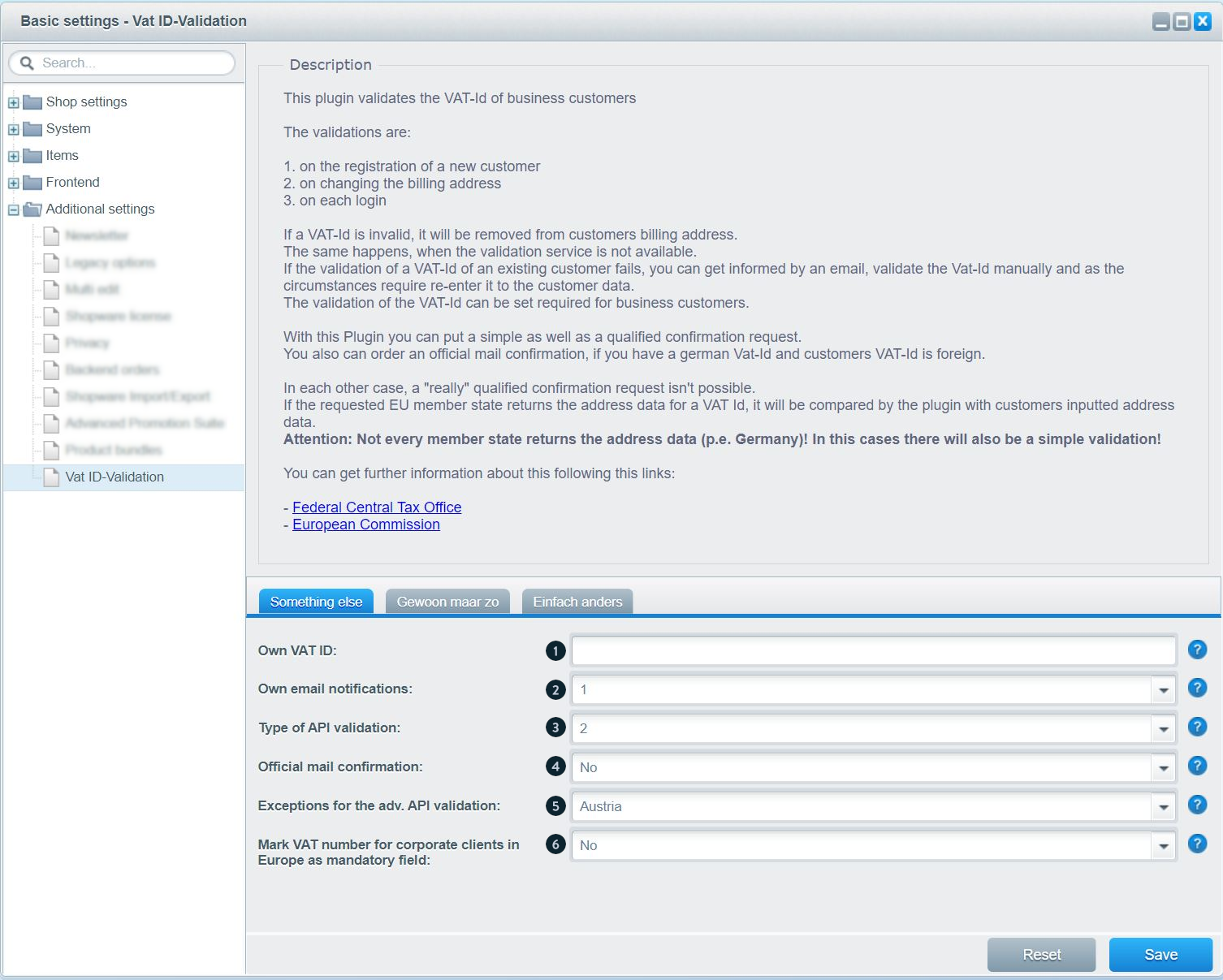
- (1) Please enter you own VAT-ID here.
- (2) In this option you can define, if you want to get a notice for an invalid registration. This can e.g. be done by changing the configuration.
- (3) The extended validation can only be done if you as a shop owner have a German VAT-ID. The request is done with the Federal Central Tax Office and might validate the address data depending on the country.
- (4) The official confirmation notice is send by mail and can be activated optionally. Further information for this can be found on the homepage of the Federal Central Tax Office of Germany
- (5) If the entry of the VAT-ID is mandatory, you can choose countries that the VAT-ID is not mandatory for in this field. In not-EU-countries there is no VAT-ID, so those are automatically excluded from the compulsory statement.
- (6) Here you can Mark the VAT ID number as mandatory for corporate clients in Europe.
Registration with simple validation
You can see and change all error messages occurring in the frontend in the snippet management. You find the snippets in the namespace /frontend/swag_vat_id_validation/
Possible error messages:
- The provided VAT ID is too short.
- The provided VAT ID is too long.
- The provided VAT ID has an incorrect country code.
- The provided VAT ID contains incorrect characters.
For this you have to mind that there are different ways of presentations in the frontend. On the one hand there is an error message that is validated right after the entry. This one is displayed next to the field on the right. On the other hand there is an error message atop of the area after you send the form.
Registration with extended validation
For the extended validation you must have a German VAT-ID. This has to be entered in the plugin configuration first. After activating the extended check you can get many different error messages:
Possible error messages:
- The provided VAT ID is invalid or does not match the provided address.
- The provided VAT ID is not registered in the associated EU member state.
- The provided VAT ID is not valid until %s.
- The provided VAT ID was only valid between %s and %s.
- The provided VAT ID doesn't match the structure of this EU member state's VAT IDs.
- The provided VAT ID doesn't match the digit check rules that apply to this EU member state's VAT IDs.
- The provided VAT ID contains incorrect chars.
- The provided VAT ID has an incorrect country code.
- Your VAT ID has only been approved for taxing intra-EU transactions. You are not allowed to place confirmation requests.
- Your German VAT ID is invalid. A confirmation request is not possible. Contact the Federal Central Tax Office in Saarlouis for more information.
- The provided VAT ID has also been associated to another user. Your request could not be process. Please try again later.
- The validation of a German VAT ID is not supported.
- Your German VAT ID is invalid. It has to start with 'DE' followed by 9 digits.
- Your request does not contain all needed information for a simple confirmation request.
- Your request does not contain all needed information for an extended confirmation request.
- An error occurred while processing the data for the requested EU member state, and your request could not be processed.
- An extended confirmation is not possible at the moment.
- An error occurred while processing the extended confirmation request.
- An error occurred while processing your request for an official mail confirmation. You will not receive one.
- We are not able to process your request at the moment. Please try again later.
- Currently your request cannot be answered by the associated EU member state
The extended validation is only available for customers with an international VAT-ID or EU-member-countries. A validation of national VAT-IDs is not possible.
Please note that the error codes come directly from the official systems, Shopware has no
influence on the verification or its result.
You can find more information on the audit on the website of the
federal
central tax office of Germany in the section Questions and Answers..
VAT-ID in an existing customer account
If you activate the extended validation afterwards the validation is also done for existing customer accounts in the login process. If the previously entered address is wrong the customer gets one of the following messages:
- The provided company name doesn't match the provided VAT ID
- The provided street and street number don't match the associated VAT ID
- The provided zip code doesn't match the associated VAT ID
- The provided city doesn't match the associated VAT ID
The fitting snippets can be found in the namespace frontend/swag_vat_id_validation/main.
It is not possible to complete an order with an invalid ID at any time..
E-Mail when deleting the VAT-ID
If the verification of an already deposited ID fails, you will be informed by e-mail about the removal of the ID.
This mail can be changed in the backend. For this you find the template at Configuration > Email templates in the area "System emails" with the name "sSWAGVATIDVALIDATION_VALIDATIONERROR".