
Import / Export: Customers
When importing customers you have to mind that you can only add or edit customers. It is not possible to delete customers by using an import.
General information
Before an import to the live-system is done, you should create a database backup. In any case the import should be tested in a test- or staging-system.
Basic customers
Please mind that, if you include the shipping_fields those should all contain valid values, because otherwise an empty entry is written in the database, which leads to an inconsistent shipping address. The field "unhashedPassword" is used for importing clear-text-passwords and is encrypted with the given encoder. For importing passwords please mind to give a valid encoder.
The field newsletter only sets a indicator in the database. To enter newsletter-recipients please use the separate profile.
Provided fields incl. description
| field name | description | values | characteristics |
|---|---|---|---|
| id | CustomerId in the database | numeric | |
| password | encodes password of the customer | text | with the field encoder you set the encryption of the password |
| unhashedPassword | unencrypted password | text | Only used if the column "password" is empty. The password will be encrypted with the encryption from "encoder" |
| encoder | encryption method | md5, bcrypt | Has to be included for importing a password |
| E-Mail-address of the customer | The field must not be empty | ||
| active | Sets if the customer account is active | boolean (0 or 1) | If not included the customer account is always inactive |
| accountMode | customer account or customer with fast-order-setting | boolean (0 or 1) | |
| paymentID | payment-ID | numeric | |
| firstLogin | first login | date | |
| lastLogin | last login | date | |
| sessionId | Id of the active Session | numeric | |
| newsletter | newsletter registration for customer account (Yes/No) | boolean (0 or 1) | Does not automatically set the customer as an newsletter receiver! This is only a mark for the account to check the registration |
| validation | date of the validation | date | |
| affiliate | partner op the shop | Boolean | Marks if the customer account belongs to a partner in the affiliate program |
| customergroup | customer group | text | Sets the abbreviation found at configuration > basic settings > shop settings > customer groups |
| paymentPreset | payment-ID preset | numeric | |
| language | language | numeric | |
| subshopID | connection to the language- or sub-shop | numeric | |
| referer | Connection to the partner | alphanumeric | |
| priceGroupId | Id of the price group | numeric | |
| internalComment | comment | text | |
| failedLogins | failed login tries | numeric | |
| lockedUntil | locked until | date | |
| customerNumber | customer number | text | identification mark for the customer. If already existing, an update is done |
| birthday | date of birth | date | |
| billingCompany | billing-address: company name | text | |
| billingDepartment | billing-address: department | text | |
| billingSalutation | billing-address: salutation | text | |
| billingFirstname | billing-address: first name | text | |
| billingLastname | billing-address: last name | text | |
| billingStreet | billing-address: street | text | |
| billingZipcode | billing-address: zip code | text | |
| billingCity | billing-address: city | text | |
| billingPhone | billing-address: phone number | text | |
| billingCountryID | billing-address: country-ID | text | |
| billingStateID | billing-address: state-ID | text | |
| ustid | ust-ID | text | |
| billingAdditionalAddressLine# | billing-address: additional address line # | text | |
| attrBillingtext# | billing-address: additional attribute field # | text | |
| shippingCompany | shipping-address: company | text | |
| shippingDerpartment | shipping-address: department | text | |
| shippingSalutation | shipping-address: salutation | text | |
| shippingFirstname | shipping-address: first name | text | |
| shippingLastname | shipping-address: last name | text | |
| shippingStreet | shipping-address: street | text | |
| shippingZipcode | shipping-address: zip-code | text | |
| shippingCity | shipping-address: city | text | |
| shippingCountryID | shipping-address: country-ID | text | |
| shippingStateID | shipping-address: state-ID | text | |
| shippingAdditionalAddressLine# | shipping-address: additional address line # | text | |
| attrShippingtext# | shipping-address: additional attribute field # | text |
Minimal import
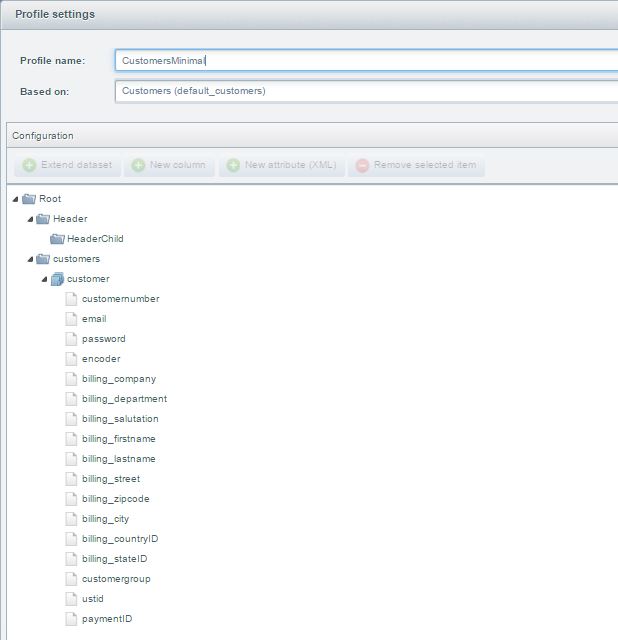
This minimal import for customers contains the mail-address, customer number, password, encoder as well as information to
billing address, a customer-group and a payment mean. Those are necessary for creating a new customer.
The profile for this import can be downloaded
here: CustomersMinimal.json
You get an example xml-file here: CustomersMinimal.xml
You get an example csv-file
here: CustomersMinimal.csv
Default profile
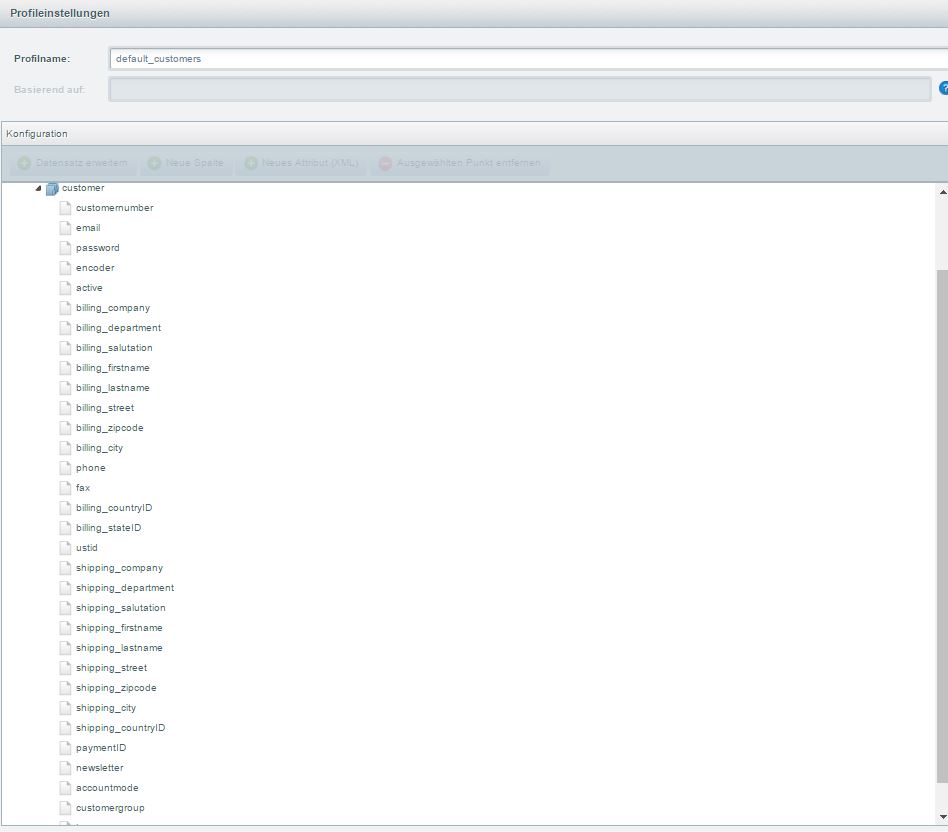
This default profile contains all mandatory fields and often used detail information.
The profile for this import can be selected from the list of default profiles by the name "Customers
(default_customers)".
You get an example xml-file here: Customers.xml
You get an example csv-file
here: Customers.csv
Profile "Customers complete"
Starting from version 2.4.0 you can use a new default profile called "Customers complete" (default_customers_complete). The primary function of this profile is exporting personal data of your customers, including generel customer data, addresses and orders. This way you can access the data of your customers by selecting the new profile for your export. Please keep in mind that this profile supports only XML as export format.
For this profile, neither editing nor import is provided. Thus it can only be found in the export's profile selection and won't appear in the "Profiles" section.